



Download X Codec Pack – lightweight Windows codec solution, free & secure
Overview
X Codec Pack is a purpose‑built codec collection designed for Windows PCs from the era of Windows 2000 up to the latest Windows 11 builds. Unlike many “mega‑codec” installers that flood a system with dozens of rarely‑used filters, X Codec Pack focuses on the six most widely‑required codecs: XviD, FFDShow, AC3Filter, VSFilter, MediaInfo and Media Player Classic – Home Cinema (MPC‑HC). The philosophy behind the pack is simple: give you exactly what you need to play the majority of video and audio formats without the bloat, without a complex configuration UI, and without the risk of destabilising your system.
Once installed, the new filters become active immediately, allowing any media player that relies on DirectShow or VFW (Video for Windows) to decode content straight away. Because there is no dedicated X Codec Pack control panel, adjustments are made through the individual codec’s own interface, conveniently placed in a dedicated Start‑Menu folder. This hands‑off approach makes the pack ideal for users who want a “set‑and‑forget” solution, as well as power users who enjoy fine‑tuning each filter’s parameters.
Whether you’re troubleshooting playback errors, converting video files, or simply ensuring a smooth viewing experience for DVDs, Blu‑rays, and online streams, X Codec Pack is positioned as the first line of defence against codec‑related headaches.
Core Features & Benefits
- Selective codec set: Only the most popular codecs (XviD, FFDShow, AC3Filter, VSFilter, MediaInfo, MPC‑HC) are installed, keeping the system lean.
- Zero‑bloat installation: No unnecessary filters, no extra DLLs, and no hidden services that slow down Windows.
- Instant activation: All codecs register with the system as soon as the installer finishes, eliminating the need for a reboot.
- Standalone configuration tools: Each codec’s settings are accessible from the Start‑Menu shortcuts, allowing precise adjustments without a central UI.
- Broad format support: Handles AVI, MP4, MKV, FLV, WMV, MPEG‑2, MPEG‑4, H.264, XviD, DivX, MP3, AC‑3, DTS, and many subtitle formats via VSFilter.
- Secure and trustworthy: Digitally signed installer, no adware, and the package is regularly updated to patch security vulnerabilities.
- Easy removal: An uninstaller script cleansly removes all components, restoring the system to its pre‑install state.
- Compatibility with popular players: Works seamlessly with Windows Media Player, VLC, Media Player Classic, PotPlayer, and any DirectShow‑based player.
- Free of charge: Fully functional without any hidden fees or premium tiers.
Installation, Usage & Compatibility
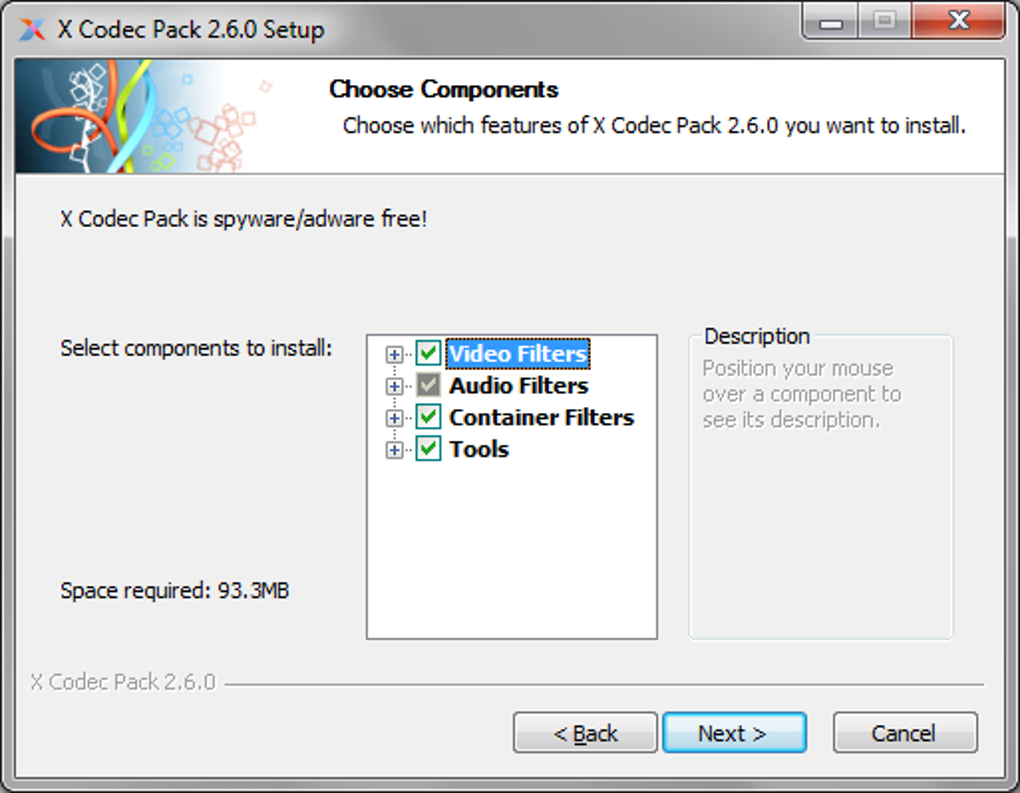
Installing X Codec Pack is intentionally straightforward. After downloading the executable (typically a .exe file under 3 MB), double‑click to launch the wizard. The installer presents three core steps: license agreement, component selection, and installation path.
Because the pack only contains the essential six codecs, the component screen is already pre‑checked; however, power users can deselect any codec they deem unnecessary. The default installation folder is C:\Program Files (x86)\X Codec Pack, but it can be changed to suit corporate policies or drive‑space constraints. Once the “Install” button is pressed, the installer copies the necessary DLLs, registers them with Windows’ DirectShow filter graph, and creates a Start‑Menu folder titled “X Codec Pack” containing shortcuts to each codec’s configuration utility.
After installation, no reboot is required—though a quick restart of any open media player ensures it picks up the new filters. To verify that the codecs are active, open MediaInfo from the Start‑Menu and load a video file; you’ll see detailed stream information confirming that FFDShow, XviD, and AC3Filter are handling the video, audio, and subtitle tracks respectively. For fine‑tuning, each codec’s shortcut opens a dedicated UI: FFDShow offers an extensive range of video filters (de‑interlacing, sharpening, denoise), AC3Filter provides a simple equaliser for audio, and VSFilter lets you adjust subtitle fonts, colors, and positioning.
Compatibility: X Codec Pack officially supports Windows 2000, XP, Vista, 7, 8, 8.1, 10, and 11 (both 32‑bit and 64‑bit editions). Because it relies on the classic DirectShow architecture, it works flawlessly on legacy hardware and on modern systems alike. The pack does not require .NET Framework or any additional runtime, making it ideal for low‑spec machines or locked‑down corporate environments. While the codecs are Windows‑centric, the underlying formats (e.g., H.264, MP3, AC‑3) are universally recognized, meaning that media files prepared with X Codec Pack will play on macOS, Android, or iOS devices when streamed or transcoded via third‑party tools.
Pros, Cons & Frequently Asked Questions
Pros
- Lightweight footprint – only essential codecs are installed.
- Free of adware, spyware, or hidden fees.
- Instant activation; no reboot required.
- Simple uninstaller restores the system cleanly.
- Regular updates keep AC3Filter and other components secure.
- Works with a wide range of media players.
Cons
- No unified graphical interface; users must adjust each codec separately.
- Limited to Windows; no native macOS or Linux package.
- Advanced users may miss some niche codecs (e.g., VP9, HEVC) that are not included.
Frequently Asked Questions
Is X Codec Pack really free?
Yes, X Codec Pack is 100 % free. There are no hidden costs, premium versions, or bundled software that require payment.
Will installing X Codec Pack affect my existing codecs?
The installer registers the new codecs with higher priority, but it does not remove existing ones. If you encounter conflicts, you can manually adjust the filter order using tools like GraphEdit or simply uninstall the unwanted codecs.
Can I use X Codec Pack on a Windows 10 laptop that already has Media Player Classic installed?
Absolutely. X Codec Pack is designed to complement MPC‑HC by providing the underlying filters (XviD, FFDShow, etc.) that MPC‑HC relies on for decoding. After installation, MPC‑HC will automatically use the new codecs without any extra configuration.
How do I remove X Codec Pack if I no longer need it?
The package includes an uninstaller accessible via Control Panel → Programs & Features or directly from the Start‑Menu folder. Running the uninstaller will deregister all installed filters and delete the program files.
Does X Codec Pack receive regular updates?
Yes. The development team releases updates whenever a new stable version of AC3Filter, FFDShow, or other included codecs becomes available, ensuring compatibility with the latest media formats and Windows security patches.
Conclusion & Call to Action
For Windows users who have grown weary of bloated codec installers and endless pop‑up dialogs, X Codec Pack offers a refreshingly minimalist solution. By concentrating on the six codecs that dominate everyday playback scenarios, it eliminates unnecessary system clutter while delivering reliable, high‑quality decoding for video, audio, and subtitles. The installer’s no‑frills approach means you spend less time configuring and more time watching your favorite movies and series. Moreover, the free price tag and regular security‑focused updates make it an attractive choice for both home users and IT professionals seeking a dependable baseline codec suite.
If you’ve experienced stuttering video, missing audio tracks, or unreadable subtitles, give X Codec Pack a try. Download the installer, run the quick setup, and let the codecs work their magic. Should you later need fine‑grained control, the individual configuration tools are just a click away. In short, X Codec Pack is the practical, secure, and cost‑free first step toward flawless media playback on any Windows machine.
Ready to eliminate codec headaches? Download X Codec Pack now and experience smooth, hassle‑free video playback today.
X Codec Pack delivers exactly what its name promises – a lightweight, effective codec suite for Windows. The lack of a central UI might deter beginners, but the trade‑off is a clean system free of unnecessary files. Overall, it’s a solid choice for anyone looking to resolve playback issues without paying for a commercial solution.







